Saturday, January 29, 2011

More on Quantum Redshift


Okay, just wanted to make a quick update on Quantum Redshift (XDK 4721). I'm going to update the status of this game to ingame with an asterisk or two for the due to the fact that it does show ingame gfx even though you can't interact with it. It's still really buggy and I don't know what's causing those hideous bugs. There's no push buffer usage, and the primitives are rendered via D3DPT_TRIANGLESTRIP. Maybe I should check the FVF for unsupported flags.

The primary issue is the fact that this texture keeps failing to create/resigter! It's always the same 512x512xDXT1 texture (8 mip levels). I don't think my VRam gets full, but I don't seem to have any problems creating a texture with the same specs outside of Cxbx. Strange.... o_O Meh, this project needs OpenGL so badly, and the Direct3D8 support for modern card drivers aren't too great either. I did get a dirty disc error once, but that was before these errors started poping up. Since the game is loaded in a seperate thread in the background while you are being given a tour of the map, it will keep going forever since the texture failed to create. I wish the stupid thing would work. Those texture specs are no big deal and take up minimal VRam.

"Don't just complain about no OpenGL support, get it working!" Hey, I'm working on it! Xbox Direct3D is rather complex and it will take some time to get it working right, you hear? Speaking of that, I think I finally found a permanent solution to our PixelShader problems. Instead of converting pixel shaders to low level assembly (i.e. GL_ARB_fragment_program), we can use Cg and choose what ever fragment shader profile we want, or let Cg choose for us. This way, we won't have to worry about any shaders being too long to convert properly. It will raise the system requirements a bit, but it's a small price to pay for accuracy! I plan to do the same for vertex shaders too. Fortunately for us, _SF_ released his pixel shader conversion code years ago and gave coders permission to use it (as long as we give him credit of course). Ahh, just can't wait to kick Direct3D8 to the curb!

Just got these details a little while ago. Hopefully I can find out what is causing controller input not to work for some games. It's preventing me from making further progress. :(

Shogun.

Whacked! is playable and more

I hope that this update is proof that I DO listen to user's requests!


Let's kick off the new year with some cool updates, shall we? Got lots to share, but so little time to share it all xD

As you can see, the game known as Whacked! (XDK 4831) appears to be playable for the most part, but I do have some good news and some bad news about it, and hopefully the bad news won't apply to you. But first, let me do a quick rant. Whacked is my 3rd favourite Xbox game of all time, and it makes me feel great knowing that it's now playable on Cxbx and cheers to the guy that requested it too. It only took me one night to get it working, fortunately. This is how I got it working.

When I first tried to emulate Whacked, I was ready to pull my hair out! Cxbx did not initially support XDK 4831, and it's been on my todo list for a long time. Knowing that 4928 is treated as XDK 4627, I figured that it would work if I did the same for XDK 4831. Did it work initially? Nope. That was the most annoying part. Eventually, I found out that it was missing a call to XapiApplyKernelPatches, which was thought to have originated in XDK 4928. So I added that, and that XDK started working normally. Did Whacked work after that? Nope. I was still getting crashes for some strange reason. I couldn't figure it out to save my life at the time, then when I found it, I felt like a n00b! Read on.

A few days ago, I bought some used Xbox games from the GoodWill store for $5 USD each. One of them was the Exhibition demo disc. I know they are only demos, but I got it anyway because it said it had content for DOA3 (which was released prior to Xbox Live's launch, giving it potential value knowing that Xbox Live for Xbox1 is dead). Now, I took it back to my place and did a dump of that disc and just for the heck of it, I tried the Whacked demo. It crashed for the same reason. So I pulled it up in IDA, and it turns out it was just a missing call to D3D::PixelJar::Lock3DSurface. Easy fix, but it's a mystery why that was never added. When I found out that was the thing stopping it from going ingame, I damn near slapped myself because I was stumped on this for a very long time. Did Whacked become playable after that? Still no -_-. Took me a few hours to track the next problem, but I got it though. Turns out that it was just a missing call to XMediaObjectCreateEx. I wrote enough code to make the function fail, but the game still worked after that. That's what fixed the game, and now other games that use it should have less problems, because honestly, I've been dodging this API for a while.

"Okay, it works! Now that's the good/bad news?" Okay, sorry. Had to get that off my chest :)

While the game does appear to be playable, I do want to address a few things.

Good:
- Runs at stable frame rates with debug logging disabled.
- Uses time based movement and every map appears to work so far.

Bad:
- I think I'm having driver issues with my PC and this game. It likes to crash sometimes when creating a 128x256x16 texture. Might not effect everyone.
- Missing textures and post processing effects.
- No sound (the audio is hilarious).
- Only works in debug mode so far. Playing in retail mode crashes.

The point is it works, and when I get the opportunity to update the SVN, you can try it for yourself and see what happens.

Next on our list is Quantum Redshift (XDK 4721). This is another game that a user requested (which was also on my todo list). I can't get passed the menus because the controller won't respond. This is the same problem with Metal Arms. This game makes use of blending effects that are only available on PC via OpenGL. Last time I checked, Direct3D is not capable of using constant colours for blending. Sucks, but I'm working on the OpenGL layer still, and it will be supported once it's finished. This is another one of my favourite games. It's a totally awesome futuristic racing game with an excellent soundtrack. Highly recommended by blueshogun! In the future, I'll look into the issues with this game.

Next is World Series Baseball. This image was submitted by Bill_gates (no, not the Microsoft founder), and since I don't have this game, I can't go any further on it yet. Why the strange interlace-like look? I dunno, looks like a problem with his ATI card drivers :/

Lastly is Splinter Cell the demo version. I also have the full version, but it doesn't play the intro video in Cxbx. I haven't found out why, but I'll look into it later. That game is a headache to deal with. At least the demo shows that there is hope somewhere along the line for it though.

So there you have it, some cool new updates and proof that I do consider user requests. Don't make this your green light to make ridiculous requests like crazy, but requests are fine. Just don't expect it to happen right away.

Stick around,

Shogun.

Tuesday, December 21, 2010

More on Innocent Tears & [Native] XInput support.


Okay, I made a quick examination of the game's contents to see how tough it will be to get this game working. So far, I hate to say it, but it's going to be rather tedious :( This game contains multiple .xbe files besides the default.xbe itself that are loaded at different times while the game is running. One for intros, gameplay, movie play back, etc. It can be done, but it's going to be really annoying! Fortunately, I learned how to handle this situation with Unreal Championship. We'll have to launch the specified .xbe file each time in order to progress through the game. Cxbx saves the launch data as CxbxLaunchData.bin and loads it when necessary so the game can function properly. Then there are some new DirectSound APIs I have to add (one looks really daunting) and maybe we'll get somewhere. Either way, the compat list is now 40! Thanks to everyone who helped make Cxbx what it is today, including the fans and other enthusiasts that refused to let it die!

"Wait, you added XInput support?" Yup, XInput for the 360 controller is supported now, but for some reason, it works on some games, but doesn't work on others :( I don't know why this is, but I'll continue to look into it. Using DirectInput for the 360 controller isn't really desirable since we miss out on rumble and the d-pad, so I added it. Btw, is this desirable for you guys? If so, then as a result, Cxbx won't support Win2k anymore because XInput only works on XP and later. Just so you know.

Just thought I'd throw this quick update out there for you (while I actually have the chance).

Shogun.

Random update(s) & OpenGL project updates.


Yup, that's right. I'm still kicking! And now that I have a spare moment, I thought I'd share some good news with you all. Nothing spectacular, but hopefully this might interest someone out there :)

As you can see here, the game known as Innocent Tears is showing stuff. This screenshot was not taken by me, btw. It was taken by Bill_gates (no, not THE bill gates, the one on ngemu!) and I don't have this game for myself (yet) but since it uses XDK 4627, I think getting it working passed this screen won't be too hard.

The next thing I wanted to mention was that I finally figured out what was causing Azurik to hang in XP. Turns out it was an Xbox exclusive flag being set that matched a PC flag. The flags MEM_NOZERO (Xbox) and MEM_ROTATE (PC) have the exact same values and causes failures when used with MEM_COMMIT. So all I had to do was omit that flag, and bam, it works again. Why this flag combination works on Vista and later is beyond me, but meh, I'm glad I solved the problem on XP. Azurik still looks rather horriffic going ingame (I've never seen such major distortions in any game to date), and Cxbx generates some funky pushbuffer results for it. No clue how I'm going to emulate this game properly :(

One more thing, I started writing my Xbox Direct3D -> OpenGL 1.5 driver last week in my spare time. So far, it works okay, but it still has a long way to go until it is ready to handle Cxbx. It wasn't really hard or anything, just having to fix annoying bugs to get it to work and trying to support the large array of features and formats is going to take time. It's not intended to replace the actual Direct3D .dlls, but it's (right now) a customized .dll that I aptly named d3d8_xbox.dll that is called instead of d3d8.dll, but you still have to link it with the project. Right now, I'm just testing it against DXSDK examples to make sure it works okay. Here's what I did so far:
  • D3DDevice creation and OpenGL initialization for windowed and fullscreen modes. Also uses glew to initialize the required extensions, saving me precious time and headache.
  • Primitive rendering via D3DDevice::DrawVertices[UP] and D3DDevice::Begin/End. Right now, it uses immediate mode because my vertex array code kept crashing, but for now, getting it to work is the primary concern. Any calls to D3DDevice::DrawPrimitive[UP] are redirected to the above by default. Indexed geometry is not yet supported. Also, every primitive type is supported, so no more primitive patching for non standard primitive types like D3DPT_LINELOOP, D3DPT_QUADLIST and D3DPT_QUADSTRIP! This should run much faster in Robotech: Battlecry and Panzer since they rely on Quad rendering heavily. Also, I'm going to stick with immediate mode for D3DDevice::Begin/End since that's basically what it is, and speed isn't critical for these related APIs.
  • Very basic push buffer emulation via D3DDevice::BeginPush/EndPush. Once again, I'm using immediate mode for it. Works like a charm.
  • World, View and Projection matrices/transformations. I found another D3D -> OpenGL wrapper out there and got the idea for how to do it from that project (dxwgl, IIRC). Before then, I couldn't figure out how to do it. The solution was simple once I understood how it worked.
  • Lighting. It works, but only when I don't set the light position :/ I wonder why that is... Btw, is there an OpenGL equivelant to the "Range" field in D3DLIGHT?
  • Textures and surfaces work, but I only wrote support for D3DFMT_X8R8G8B8 and D3DFMT_A8R8G8B8 so far. Textures use the standard 2D texture, but surfaces use texture rectangles since they are more efficient for such an operation. Special care has to be taken into consideration when dealing with surfaces to make sure they behave properly when rendering normal 3D geometry with certain render states. For instance, I have to disable almost every render/texture state prior to rendering it, but it pays off with speed. My surface code is about 4x faster than Direct3D itself, even when using immediate mode!
  • Various render states. I haven't finished adding all the renderstates, but many of the renderstates not supported by standard Direct3D have been implemented, so we no longer have to worry about those!
There are many more features to go, but give me a month, and hopefully it should be working at a satisfactory level. The big thing that troubles me is converting the vertex/pixel shaders to OpenGL vertex/fragment programs. I can use NVparse and do this easily, but then we'll be limited to NVIDIA cards and ATI users will be left out, or is there an equivelant library for ATI users? If not, I'll try to use the ARB versions for both. Okay? If it works, then we can kiss many of our compatibility problems goodbye!

So, there you have it. This is everything I've been up to so far. I'm still having it rough IRL (well, not too bad since I have stable housing now) but at least I have a bit more free time atm (but I can't spend it all on Cxbx unfortunately). Isn't open source a great way to go?

Shogun.

EDIT: I found this today: http://realmforge.tigris.org/source/browse/realmforge/trunk/src/Axiom/RenderSystems/OpenGL/ATI/PixelShader.cs?revision=5&view=markup

It's in C#, but maybe a bit of hope for the ATI users for a working vs/ps1.1 -> ATI vertex/fragment program conversion.

Tuesday, November 9, 2010

Metal Arms and more!


Now, I realize I've been leaving you all in the dark for a while, and I'm sorry about that. But please understand that I absolutely MUST take occasional breaks from Cxbx and the emulation scene. Not only do I have a life outside of Cxbx (which you all can understand, I hope), but I can't overload myself or else I can't make good progress! I usually do better when I take a break for a month or two after exhaustion, then come back full force. The above screens are proof of this. Let's get on with the updates (I only have 7 minutes).

Lately, I've been putting some time and effort into emulating games with XDKs 5233-5558. Since I have the XDKs necesarry and games that I've been neglecting, I thought I'd take the time out to see what I could get working.

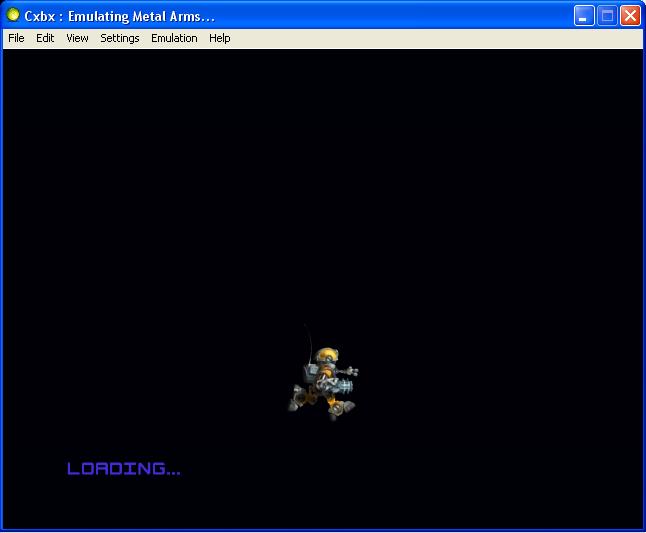
Metal Arms (First 4 screens, XDK 5558): This game is friggin awesome! I've been working with this game since yesterday, and it's already looking good. The intro videos play fine, but are a bit stuttery (as usual) and it reaches the menu screen just fine (but lacks textures, etc). "So, can you play it?" TBH, I don't know. The controller doesn't respond at all, so I can't find out if it goes in game or not. Keep in mind, that only the buggy screen represents in game gfx, not the others (they are all bink videos). If anyone has this game, please try it next time I get the SVN updated.

The other two screens are Tetris Worlds Live and XIII. Sorry, I have to cut this short, I only have a few seconds. I'll complete this update later. Stupid library...

Shogun.

Thursday, November 4, 2010

Gauntlet: Dark Legacy


Yeah! That's what I'm talking about, an RPG on Cxbx! But hey, any progress is good progress. Credit goes to LoveMhz for discovering this. I have to get a copy of Gauntlet sometime.

"Where have you been all this time?" Relax guys, some emu authors disappear for years without saying anything, just be happy I only disappear for months at a time :) But seriously, I'm in a lot of mess right now, and it's going to take a while to get it all sorted out. Housing, jobs, credit, the stuff you hate dealing with. Yeah, it sucks.

Enough of that, I'm tired of whining! As you can see, Gauntlet: Dark Legacy (XDK 4242) is starting to work to a certain extent. So far, it only goes to the menus (keep in mind that I only have these screens to go by for now). When I get the game, I'll see what else needs to be fixed to get it working in general. I'm hoping that it's just a few missing APIs preventing it from working, and if that's all, it just might work no problem. So far, games that use XDK 4242 have been surprisingly easy to deal with (so far, I've only seen 3 games uses this XDK, including Smashing Drive and Slam Tennis) since it's basically the same as 4361.

"What's with all the texture bugs?" Good question... until I actually get the game, I can't really answer that. My guess is that the textures are being registered in the wrong formats (luminance, maybe?) or maybe it's a driver issue. Who knows. So when I get it, I'll see what I can do.

Unfortunately, my internet time has been reduced to little or none on a given day. I miss having control in life! Meh, could be worse...

Shogun.

Sunday, September 26, 2010

Pixel Shader 1.3 support.

This is something I've been meaning to write for a long time, but never got around to it. The lay off is hitting me rather hard and I no longer have the net at my house. This is bad, but not enough to stop me completely.

So, what about pixel shader support? Well, Cxbx has gone too long without it for starters. Second, i didn't write it. This the work of kingofc! "What? Kingofc is back?". I wish... but defiance managed to get ahold of him and passed on his work to us. I thought it would never happen, but it did!

"So, how does it work? Can I play game X now?". No. It just another improvement gfx wise. It's not perfect and causes more crashes on certain instances. Since I'm runnin XP, the exception handler doesn't always report crashes properly (just exits). So until I can install Win7 on this laptop (painfully hard!) that won't work properly.

Since I'm on my iPhone, I don't have much time to post, but I want to leave you with one more thing. It turns out that Cxbx does run better on Vista than on XP. I haven't had the liberty of trying Win7 because i can't get the stupid thing to install (stupid ACPI bios thing). Example: Azurik absolutely refuses tonrun on XP and so far only works on Vista. I hate Vista.

So here's a small update for you. Hoping to have more soon.

Shogun.